This is a script you run on your own machine. It takes a snapshot of your pages, then tells you exactly what changed the next time you run it — in the terminal and as an HTML report you can send to a client.
No account, no subscription, no data leaving your computer. It's about 600 lines of JavaScript with zero dependencies to install.
What it catches
Critical
- A
noindexdirective appearing - Canonical tag changed or removed
- A page starting to redirect
- A meta refresh redirect appearing
- 404, 500, or the page becoming unreachable
- Structured data removed entirely
- JSON-LD breaking so it no longer parses
Warnings
- Title tag rewritten
- Meta description changed
- H1 changed or removed
- Redirect target changed
og:imageremoved- Content changed by more than 30%
What the report looks like
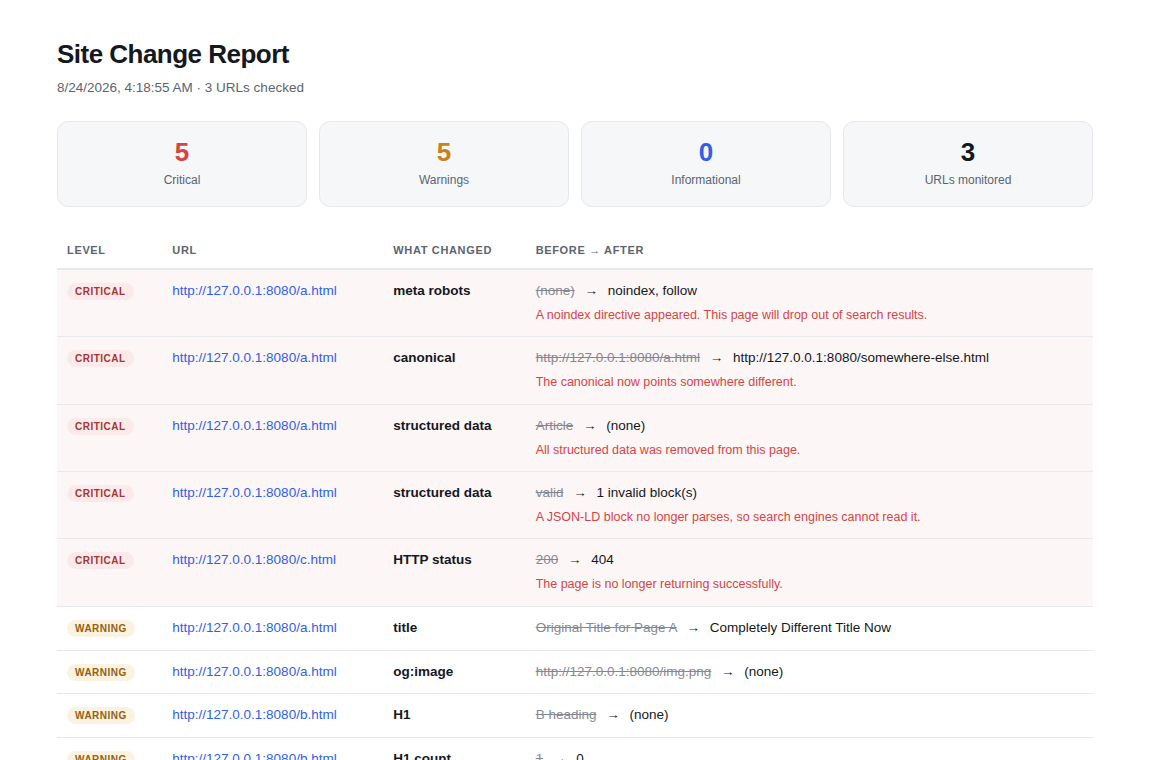
What running it looks like
$ node monitor.js

  Site Change Monitor — checking 24 URLs

  CRITICAL (2)
  ------------------------------------------------------------
  https://yoursite.com/services
    meta robots: (none)  ->  noindex, follow
    A noindex directive appeared. This page will drop out of search results.

  https://yoursite.com/pricing
    canonical: /pricing  ->  /plans
    The canonical now points somewhere different.

  Report: reports/latest.html
  2 critical change(s) detected — exiting with code 1.
Setup takes about five minutes
Install Node.js from nodejs.org if you don't have it. Paste your URLs into urls.txt, one per line. Run node monitor.js once to take a baseline, then again whenever you want to check.
The included guide covers scheduling it daily with Task Scheduler on Windows or cron on Mac and Linux, and setting up Slack or Discord alerts. It's written for people who don't write code.
Use it as a deploy check
The script exits with code 1 when it finds a critical change, so it works as a CI step. If a deploy introduces a noindex, breaks a canonical, or takes a page offline, the build fails. That's the difference between catching it in five minutes and catching it in five weeks.
Honest about what it isn't
It doesn't track rankings, keywords, or backlinks — those need data I'd have to buy. It doesn't run JavaScript, so content injected client-side won't be compared. And it can't watch pages behind a login.
What it does is one thing, properly: notice when your pages quietly change.
Questions
Built while monitoring this site. Related: free on-page analyzer and real technical SEO mistakes.